NiKo (Nikola Kovač) plays CS2 on a Razer DeathAdder V4 Pro NiKo Edition. He runs 800 DPI with 0.9 in-game sensitivity, for an eDPI of 720. His current crosshair code per ProSettings is CSGO-xQsAb-b7J42-qcvvS-5AG9v-VwLXL: Classic Static, tight overlapping gap, no dot, blue-green color.
Video runs at 1280×960 in 4:3 stretched, fullscreen. Global Shadow Quality stays on High for opponent-shadow visibility; other graphics options sit at low. Viewmodel FOV sits at 68, the pro maximum. Every value reflects a precision-first philosophy refined across Mousesports, FaZe Clan, G2 Esports, and Team Falcons.
NiKo's Hardware & Equipment Setup
NiKo runs an almost entirely Razer-sponsored kit through the Razer NiKo Collection ambassador partnership. Every choice supports the same goal: low input latency and predictable feedback across thousands of hours.
Item |
Model |
Spec |
Detail |
Mouse |
Pulsar ZywOo The Chosen Gen.2 |
400 DPI |
1000 Hz polling |
Keyboard |
ASUS ROG Falchion Ace HFX ZywOo Edition |
HFX magnetic |
Rapid trigger |
Monitor |
BenQ ZOWIE XL2586X+ |
600 Hz |
1080p Fast-TN |
Mouse — Razer DeathAdder V4 Pro NiKo Edition
The NiKo Edition launched alongside his Razer partnership. Internals match the standard V4 Pro: lightweight optical, wireless. At LAN events NiKo has occasionally appeared with the Logitech G Pro X Superlight 2. His sponsored home kit and tournament kit can differ.
Keyboard, Monitor, Headset & Mousepad
The BenQ ZOWIE XL2586X+ is the highest-value peripheral. At 600Hz, motion smoothness exceeds 240Hz panels. Razer Huntsman optical switches register faster than mechanical, and the Razer Gigantus V2 Pro NiKo Edition ships as part of his signature collection.
PC Specs — CPU and GPU
CS2 leans on CPU single-core performance, which is why the Intel Core i9-13900KS anchors his build. NiKo's software config copies for free; hardware costs thousands.
NiKo's Mouse Settings — Sensitivity, DPI & eDPI Explained
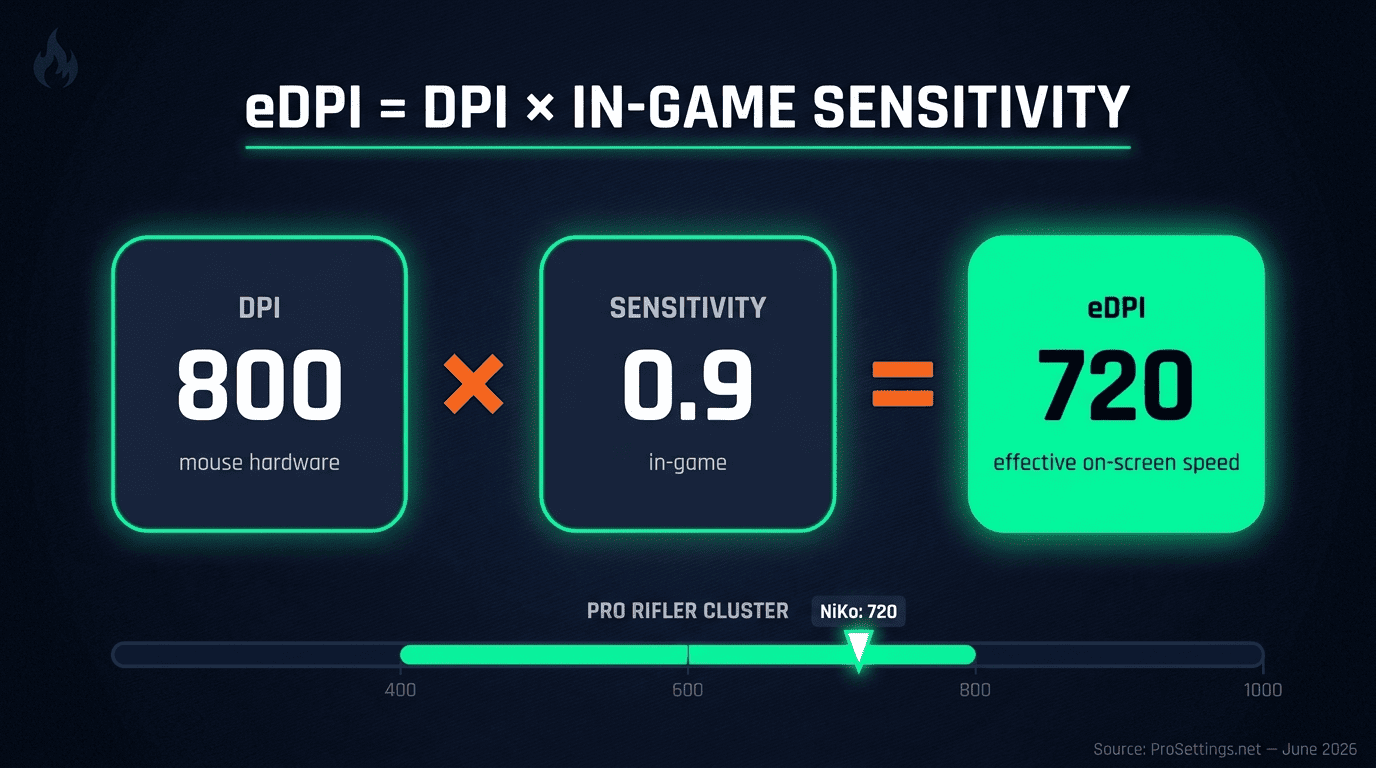
Mouse settings shape aim more than any other variable in CS2. NiKo's 800 DPI × 0.9 sensitivity lands at 720 eDPI. That sits near the pro rifler median. Windows Sensitivity stays at 6/11 with Raw Input on.
If you follow NiKo on Team Falcons CS2 matches, his low-eDPI consistency is a useful tell for his playstyle. It is not a guarantee of his results.
DPI, Sensitivity & eDPI — What the Numbers Mean
eDPI multiplies mouse DPI by in-game sensitivity. The result reflects your true on-screen cursor speed. NiKo's math: 800 × 0.9 = 720.
Pro CS2 players cluster between 400 and 900 eDPI. Lower eDPI rewards crosshair placement and punishes lazy movement.
Zoom Sensitivity, Polling Rate & Windows Sensitivity
NiKo's zoom sensitivity sits at 0.9, matching his hipfire ratio for consistent scoped feel. He runs his mouse at 2000Hz polling rate, doubling the older 1000Hz pro standard. Windows Sensitivity stays at 6/11 because any other value breaks raw input consistency between practice and matches.
Why NiKo Uses Low eDPI — Expert Analysis
Low eDPI wins at elite level because crosshair placement does most of the work. Strong pre-aim shrinks every required flick. Small flicks beat panicked wrist corrections. If you sit above 1200 eDPI today, drop 10 to 15 percent per week toward 720.
NiKo's Crosshair Settings & Code
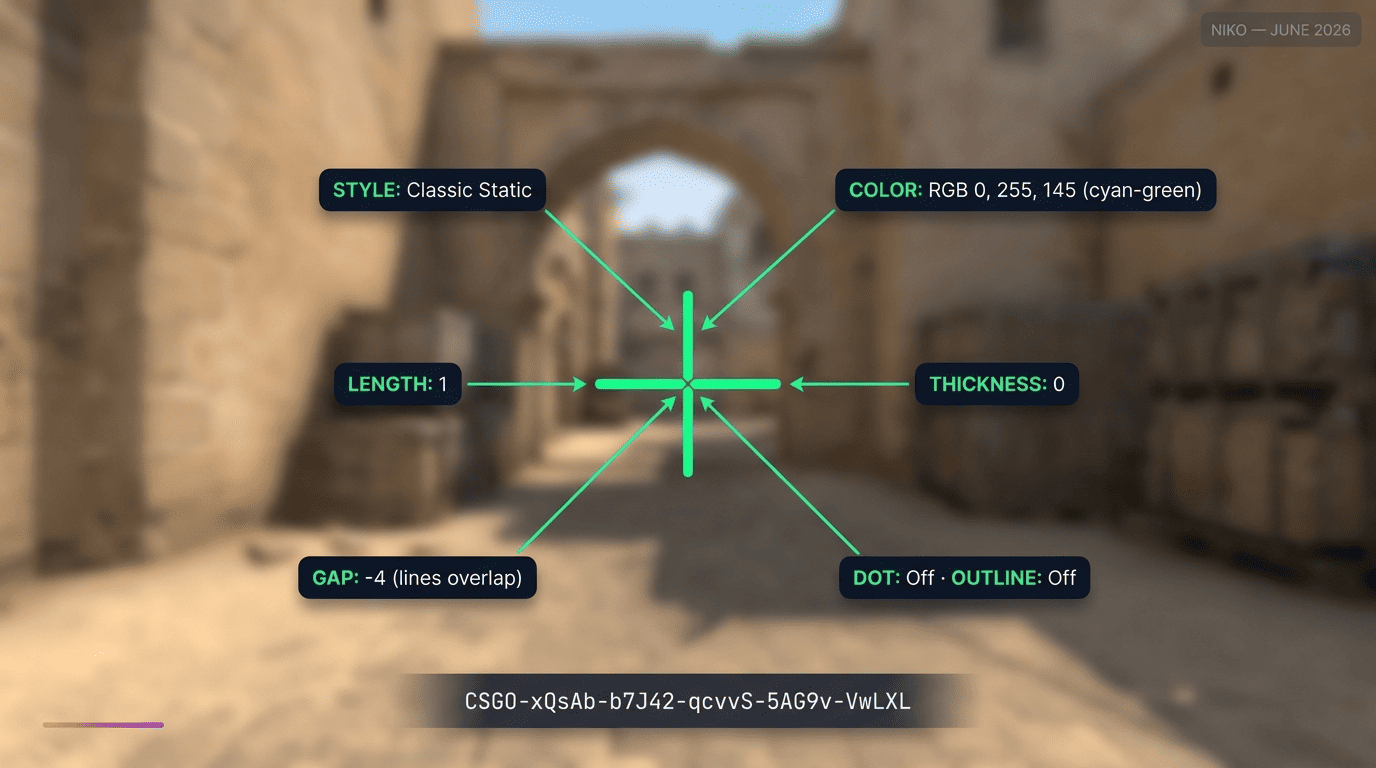
NiKo's crosshair stays small, tight, blue-green, with no dot and no outline. Gap -4 makes the lines overlap, producing a compact aim point that hugs target heads.
NiKo's Crosshair Code for Instant Import
His current code per ProSettings.net:
CSGO-xQsAb-b7J42-qcvvS-5AG9v-VwLXL
Apply it in three steps:
- Open CS2, go to Game Settings, then Crosshair.
- Click the Share or Import icon.
- Paste the code and confirm.
NiKo updates his crosshair between tournaments. A/B test for 5 to 10 hours before judging fit.
Crosshair Parameter Breakdown
- Style: Classic Static. Same shape during movement and firing.
- Length: 1. Short lines, low visual footprint.
- Thickness: 0. Thin lines, minimal screen footprint.
- Gap: -4. Lines overlap for a tight aim point.
- Dot: Off. Builds placement habits.
- Outline: Off. Cleaner profile against varied backgrounds.
- Color: RGB 0, 255, 145 (cyan-green). High contrast against earth-toned maps.
- Follow Recoil: Off.
- Sniper Width: 0. Default scoped reticle.
- T-Style: Off. Full crosshair kept on screen.
- Deployed Weapon Gap: Off. No automatic widening when a weapon is drawn.
NiKo's Video Settings — Performance Over Aesthetics
NiKo's video config trades polish for frame stability and clear enemy models. Resolution sits at 1280×960 in 4:3 stretched, fullscreen. Stretched 4:3 widens enemy models by roughly 25 to 30 percent.
Basic Video Settings — Resolution, Aspect Ratio & Display Mode
- Resolution: 1280×960
- Aspect Ratio: 4:3 (Stretched)
- Display Mode: Fullscreen
- Brightness: Slightly elevated
Fullscreen is mandatory at pro level because the OS prioritizes render time to the foreground window. Windowed modes introduce frame pacing variability that competitive play cannot tolerate.
Advanced Video Settings — Shadows, Anti-Aliasing & NVIDIA Reflex
Global Shadow Quality stays on High because shadows reveal enemies before they round a corner. The competitive read outweighs the GPU cost. Multisampling Anti-Aliasing runs at 8x MSAA for cleaner edges on enemy outlines. NVIDIA Reflex Low Latency sits disabled in his current config, V-Sync stays off, and FidelityFX Super Resolution stays off because both add latency.
NiKo's Viewmodel Settings
Many intermediate players never touch viewmodel settings. NiKo pushes his weapon model to the screen edges because every blocked pixel hides potential enemy information. CS2 caps viewmodel FOV at 68.
FOV, Offset Values & Presetpos Explained
Paste these in the developer console:
viewmodel_fov 68
viewmodel_offset_x 2.0
viewmodel_offset_y 0
viewmodel_offset_z -1.5
viewmodel_presetpos 2
The X offset pushes the weapon right, the Z offset lowers it. Presetpos 2 sets the baseline pose; offsets refine from there.
NiKo's Radar Settings
Radar tuning is the most underrated category in pro config guides. NiKo runs a notably wide radar at zoom 0.27. A wider view shows more rotation and teammate data at a glance.
Radar Configuration Values
- Radar Centers The Player: Yes
- Radar Is Rotating: Yes
- Radar HUD Size: 1.0
- Radar Map Zoom: 0.27
- Toggle Shape With Scoreboard: Off
NiKo's HUD Settings & Key Bindings
HUD scale stays small to preserve screen real estate, matching the maximize-information principle behind his viewmodel. Grenade binds deliver the bigger win: dedicated keys cut half a second off every nade pull.
Grenade Key Bindings
bind "4" "slot6" // HE Grenade
bind "f" "slot7" // Flashbang
bind "x" "slot8" // Smoke Grenade
bind "v" "slot9" // Decoy
bind "c" "slot10" // Molotov / Incendiary
Enable Developer Console in Game Settings first, then paste each command in the console. Dedicated grenade keys remove the weapon-scroll delay that costs half-seconds in clutch scenarios. The change has unambiguous upside for every player type.
How to Apply NiKo's Full CS2 Config — Step-by-Step Guide
Back up your existing autoexec.cfg from Steam/steamapps/common/Counter-Strike Global Offensive/game/csgo/cfg/. Plan for 10 to 15 hours of adaptation before judging fit.
Watch the next Falcons CS2 match on PLG.bet once you have NiKo's setup loaded. Pro play reads cleaner when you know the input system behind it.
Step-by-Step Settings Application Checklist
- Enable Developer Console.
- Apply 1280×960, 4:3 stretched, fullscreen.
- Set Global Shadow Quality to High; AA to 8x MSAA; NVIDIA Reflex off.
- Set DPI 800, in-game sens 0.9, zoom sens 0.9.
- Import crosshair code CSGO-xQsAb-b7J42-qcvvS-5AG9v-VwLXL.
- Paste viewmodel block in console.
- Enter grenade binds. Pro tip: bind toggleconsole to F1.
NiKo's Settings Evolution: CS:GO vs CS2
In CS:GO, NiKo cycled between sensitivity values from 1.35 to 1.6 at 400 DPI, putting his eDPI roughly between 540 and 640. In CS2 he now runs 0.9 at 800 DPI for an eDPI of 720.
Resolution stayed at 1280×960. Crosshair style remained Classic Static with no dot. Core preferences hold steady, with sensitivity drifting upward only slightly.
Tips for Adapting NiKo's Settings to Your Own Playstyle
- Adopt immediately: video settings, crosshair code, radar config, grenade binds.
- Adapt gradually: mouse sensitivity. Above 1200 eDPI, drop 10 to 15 percent each week toward 720.
- Personal preference: viewmodel offsets, HUD color, skin loadout.
NiKo's config is a launchpad, not a destination. Build from his values, then tune to your own hand, monitor, and role.
FAQ
What is NiKo's config in CS2?
CSGO-xQsAb-b7J42-qcvvS-5AG9v-VwLXL. Viewmodel FOV sits at 68, Global Shadow Quality on High, NVIDIA Reflex off. Hardware centers on the Razer DeathAdder V4 Pro NiKo Edition.