Is Valorant Crossplay finally a reality on console? This guide breaks down Valorant crossplay support, crossplay, and cross-platform play after the console Valorant launch. Developed by Riot Games, the tactical shooter allows PlayStation 5 and Xbox Series X|S players to team up, while PC remains separate, with crosfs-progression fully explained.
Understanding Valorant Crossplay: Current Status
Valorant Crossplay is available, but with clear limitations. Yes, limited Valorant cross platform functionality exists: PlayStation 5 and Xbox Series X|S players can queue together, form parties, and play both ranked and unranked modes seamlessly.
This answers the common question: Does Valorant have crossplay? On console, absolutely. However, PC gaming remains excluded from console matchmaking.
Since the June 2023 launch of the Valorant Console Version, Riot has maintained this crossplay status to protect Competitive Integrity. Practically, console friends can team up freely, while PC players operate in a separate ecosystem.
The Official Riot Games Position
Riot Games is the final authority on Valorant Crossplay. During the June 2023 console launch, the studio stated it was “enabling crossplay between PlayStation and Xbox to unite the console community while maintaining fairness.”
This Riot Games crossplay policy confirms Valorant cross platform limits. Official support notes and leadership statements emphasize Competitive Integrity, making the official crossplay statement clear: full PC integration is not planned across modes and matchmaking systems globally for all console players.
Console-to-Console Crossplay: How It Works
The Valorant Console Version supports seamless console-to-console matchmaking through Valorant Crossplay. With Valorant console crossplay enabled by default, PlayStation 5 and Xbox Series X|S players are placed into a unified console pool with no platform preference, ensuring faster queue times and balanced competition. Valorant Xbox crossplay and Valorant PlayStation crossplay function identically, allowing cross-console parties of up to five players.
Social play is handled through the Valorant Party System. Friends are added using a Riot ID (username#tagline), after which cross-platform voice chat works automatically. The party leader selects the queue type, ranked, unranked, or other competitive modes, and matchmaking begins within the shared console ecosystem.
Importantly, this pool remains separate from PC players, preserving consistent controls and fair input conditions while keeping console play smooth and friction-free.
How to Enable Valorant Crossplay on Consoles
Valorant crossplay enable on consoles is straightforward in the Valorant Console Version. Valorant Crossplay is turned on by default, but settings can be checked anytime. From the main menu, open Settings, select General, then confirm Cross-Platform Play is enabled.
This console crossplay setup rarely needs changes unless matchmaking issues occur. On PlayStation 5, an active PlayStation Plus subscription is required for online play, while on Xbox Series X|S, Xbox Game Pass Core is needed.
If Valorant crossplay settings are missing, install the latest update and restart the game after major console patches or system updates are applied successfully.
PC and Console Separation: Why They Don't Mix
Competitive Integrity underpins why valorant pc console crossplay does not exist. Mixed-platform play would compromise fairness, as different Input Methods create unavoidable advantages. In PC gaming, mouse-and-keyboard controls allow pixel-perfect crosshair placement, instant 180-degree turns, and faster ability targeting.
Console players using controllers rely on aim assist, an intentional Valorant Console Version feature designed for accessibility, not parity. Competitive testing among tactical shooters consistently shows that mouse users achieve roughly 15-20 percent higher accuracy. Riot prioritizes competitive integrity over convenience, making PC-console crossplay a deliberate, permanent design choice.
This separation protects ranked mode integrity and ensures console competition develops without imbalance. Similar decisions exist among genre peers such as Counter-Strike and Rainbow Six Siege.
Ultimately, Valorant Crossplay focuses on fair ecosystems, not universal access, ensuring skill-based outcomes across platforms remain meaningful, consistent, and credible long-term for players in both casual and competitive communities worldwide across all regions.
Will PC and Console Crossplay Ever Be Implemented?
Will Valorant be cross platform? Looking at Valorant platforms available today, the outlook for PC console integration is clear. Riot Games has repeatedly stated since 2023 that competitive boundaries are intentional, not temporary.
There is no indication in patch notes or developer updates that Valorant will be cross-platform beyond consoles. While input-based matchmaking could technically enable PC console integration, Competitive Integrity remains non-negotiable.
Compared with casual shooters, Valorant Crossplay follows stricter esports standards, making long-term PC-console crossplay unlikely. Industry comparisons with Counter-Strike and Rainbow Six Siege reinforce this separation philosophy across competitive tactical shooter ecosystems globally.
Cross-Progression in Valorant Explained
Cross-Progression in Valorant is a full account unification system, not a bonus feature. With Valorant cross progression and Valorant cross save enabled, players can move between PC and console while keeping everything they own. The system runs through a single Riot Account, which links PC, PlayStation 5, and Xbox Series X|S under one identity. Once connected, platform transfer is seamless.
All cosmetics transfer automatically, including weapon skins, player cards, sprays, gun buddies, and purchased agents. Shared currencies such as Valorant Points and Radianite Points carry over, alongside Battle Pass tiers, weekly missions, and agent contract progress. This creates a Valorant unified account experience across platforms.
One important exception exists: competitive rank. Ranked progression and MMR remain platform-specific to protect competitive integrity, preventing rank advantages when switching inputs.
In practice, inventory and progression stay identical, but ranked placement resets per platform. This design ensures fair competition while preserving long-term cosmetic investment value for players across Valorant Crossplay ecosystems on all supported global platforms worldwide today.
Account Linking Requirements
Valorant account linking enables cross-progression setup through a single Riot Account. Visit account.riotgames.com, sign in or create an account, then open the Connections tab. Select PlayStation Network or Xbox Live, authenticate the platform accounts, and confirm access.
Email verification and two-factor authentication are required before linking completes. One Riot profile supports multiple platforms, not separate accounts. If linking fails, ensure platform account emails match.
This Valorant Riot account process takes minutes and securely, consistently, and worldwide today unlocks shared progress via Cross-Progression across console and PC platform accounts.
What Transfers Between Platforms
Cross-Progression ensures most content follows players across platforms. Valorant skins cross-platform support includes all weapon skins, player cards, titles, gun buddies, and sprays. Currency also syncs: Valorant Points and Radianite Points remain identical everywhere.
For Valorant cross-platform progression, Battle Pass tiers, rewards, daily and weekly missions, and agent unlocks all carry over, making the Valorant Battlepass cross-platform seamless. All unlocked agents and active contracts transfer instantly.
What does not move is competitive rank. Ranked tier, MMR, and leaderboard placement reset per platform, preserving fair competition. Friend lists stay unified, allowing messaging across devices, though parties remain platform-bound to protect integrity. This clarity helps players plan long-term investment without fear of lost progress.
How to Set Up Cross-Platform Features in Valorant
Setting up cross-platform features in Valorant is a structured process built around a unified account system. The foundation is a single Riot Account, which enables both Cross-Progression and Valorant Crossplay.
Step 1 - Account Linking:
Begin by linking your Riot Account to your console or PC platforms, as outlined in the account linking requirements. This connection is mandatory for any cross-progression configuration.
Step 2 - Verify Cross-Progression:
Launch Valorant on the newly linked platform. Open the Collections tab to confirm skins and agents are present, then check the Store to verify shared currency balances.
Step 3 - Enable Crossplay (Console Only):
On console, navigate to Settings → General and confirm Cross-Platform Play is enabled. This allows Valorant party crossplay between consoles.
Step 4 - Add Cross-Platform Friends:
Using the Valorant Party System, open the Social menu, select Add Friend, and enter a Riot ID (username#tagline). Console players can add other console players regardless of brand, supporting Valorant friends cross-platform functionality.
Step 5 - Form Parties and Queue:
Invite friends from the Social menu, confirm eligibility, and queue for ranked or unranked modes. Once linked, the entire setup typically takes under ten minutes from start to finish.
Troubleshooting Common Issues
Most Valorant matchmaking crossplay and cross-progression issues come from setup mismatches.
- Can’t find a friend via Riot ID? Ensure the exact username#tagline is entered (case-sensitive), confirm crossplay is enabled, and avoid PC-console friend attempts.
- Inventory not syncing? Log out fully, re-link platforms at account.riotgames.com, verify two-factor authentication on your Riot Account, wait five minutes for server sync, then restart the game.
- Crossplay toggle missing? Update to the latest patch, confirm PS5 or Xbox Series X|S, and check regional availability.
- Party invites failing cross-console? Verify subscriptions, NAT type (Moderate/Type 2), and restart. Error 43 indicates account linking problems; Error 7 points to connection timeouts within Valorant Crossplay.
Performance Differences Between Platforms
| Performance Area | Valorant Console Version (PlayStation 5 / Xbox Series X|S) | PC gaming |
|---|---|---|
| Target Frame Rate | Locked 60 FPS (highly stable) | Uncapped (240+ FPS achievable) |
| Resolution Output | Upscaled 4K | Native 1080p–4K |
| Input Method | Controller | Mouse and keyboard |
| Average Input Lag | ~50–60 ms | ~10–20 ms |
| Aim Assist | Enabled (moderate strength) | Not available |
| Visual Settings | Fixed, console-optimized | Fully scalable (Low to Ultra) |
| Particle Effects | Slightly reduced | Full fidelity |
| Draw Distance | Maintained | Adjustable |
| Loading Times | 8–10 seconds (SSD) | NVMe comparable, HDD slower |
| Competitive Advantage in Mixed Lobby | Disadvantaged | Significant advantage |
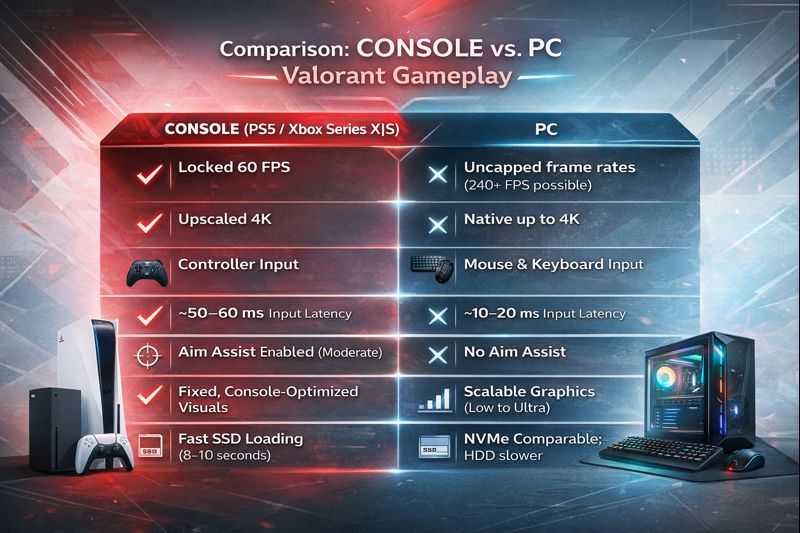
Performance differences highlight why matchmaking remains separated in Valorant. The Valorant Console Version on PlayStation 5 and Xbox Series X|S is tuned for consistency, targeting a stable 60 FPS with upscaled 4K output and moderate aim assist. Testing showed roughly 50–60ms of input lag, which is acceptable for controller play on 60Hz displays.
Visual quality is optimized for console hardware, with slightly reduced particle effects while maintaining draw distance. Loading times benefit from fast SSDs, averaging 8–10 seconds.
By comparison, PC gaming delivers clear technical advantages. In a Valorant console vs PC performance comparison, PCs run at uncapped frame rates, exceeding 240 FPS on mid-range GPUs, with native resolutions up to 4K.
Input latency drops to 10–20ms using competitive peripherals, with no aim assist. Measured frame times via RTSS and input lag using a Leo Bodnar tester confirm these gaps. Despite identical performance across both consoles, differing Valorant system requirements and responsiveness justify separate matchmaking to ensure fair balance across platforms in ranked and unranked modes.
Console vs. PC Dynamics
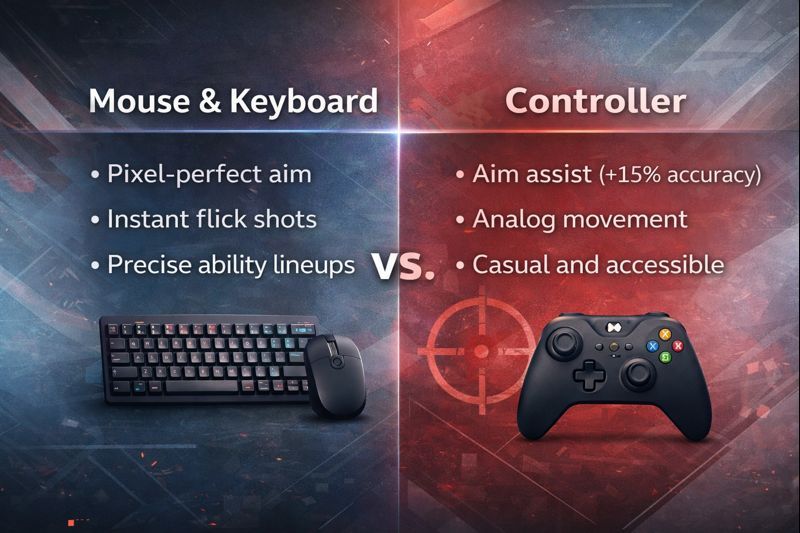
Gameplay differences in Valorant are driven by Input Methods. In a Valorant controller vs mouse comparison, mouse and keyboard dominate precision play, enabling pixel-perfect crosshair placement, instant flicks, faster peeking, and accurate ability lineups.
By contrast, Valorant controller support on the Valorant Console Version relies on Valorant aim assist console mechanics. Aim assist provides a subtle slowdown and light tracking near targets, offering roughly a 15 percent accuracy boost, but it is not aggressive.
Controllers add analog movement and comfort, appealing to casual players. Even so, Valorant input based matchmaking exists because Competitive Integrity would collapse if inputs mixed, execution speed, and flick accuracy still favor PC decisively.
Cross-Region Play and Its Complications
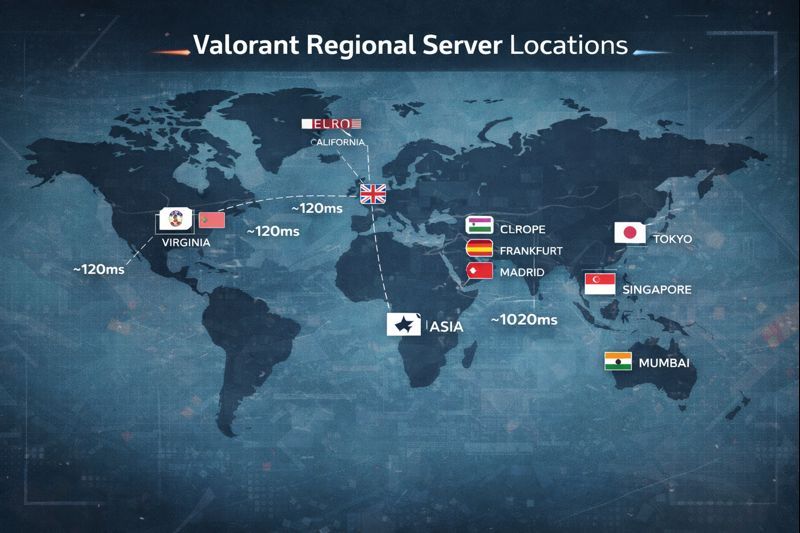
Valorant Crossplay works across different platforms, but it does not remove matchmaking regions. Valorant uses regional servers: North America (Virginia, California, Texas), Europe (London, Frankfurt, Madrid, Istanbul), and Asia (Tokyo, Singapore, Hong Kong, Mumbai).
Through the Valorant Party System, players on different Valorant platforms can form cross-region parties, but matchmaking always connects to the party leader’s region. This leads to ping differences: playing EU servers from NA can mean 120ms instead of 30ms, with noticeable input delay.
Crossplay-enabled parties still face these limits, and ranked queues restrict extreme latency, making long-distance competitive play impractical.
Conclusion: The State of Valorant Cross-Platform Play
The current cross-platform state of Valorant Crossplay reflects a deliberate, balanced design. Console players on PlayStation 5 and Xbox Series X|S enjoy seamless crossplay, while PC gaming remains separate to preserve competitive integrity. With full cross-progression via Riot accounts, most platform lock-in is removed. Riot Games prioritizes fairness over convenience, making Valorant ranked crossplay unlikely, but keeping all Valorant platforms available, healthy long term.