The Trade Up Contract is a CS2 feature that lets players exchange 10 weapon skins of the same rarity tier for one higher-tier skin. Select your skins, sign the contract, and receive an upgrade. Float values, collection pools, and market timing all determine whether that upgrade generates profit or destroys it.
Profitable CS2 trade ups demand research before every contract. Valve's October 2025 Re-Retakes update expanded the system: 5 Covert skins now craft a knife or gloves. CS2 preserves every core CS:GO mechanic while adding new CS2 Cases and a cleaner inventory interface. Skipping float calculator checks and ignoring Steam Market trends are the two most common pitfalls that turn profitable trade ups into losses.
Key Takeaways
- CS2 Trade Up Contracts exchange 10 same-rarity skins for one higher-tier skin. Since October 23, 2025, 5 Covert skins craft a knife or glove.
- The output skin's float value derives from the average float of all 10 inputs. Lower input floats produce higher-condition outputs worth more on the Steam Market.
- Profitable trade ups require pre-contract calculator verification. Contracts without price analysis carry a high risk of negative returns.
What is a CS2 Trade Up Contract?
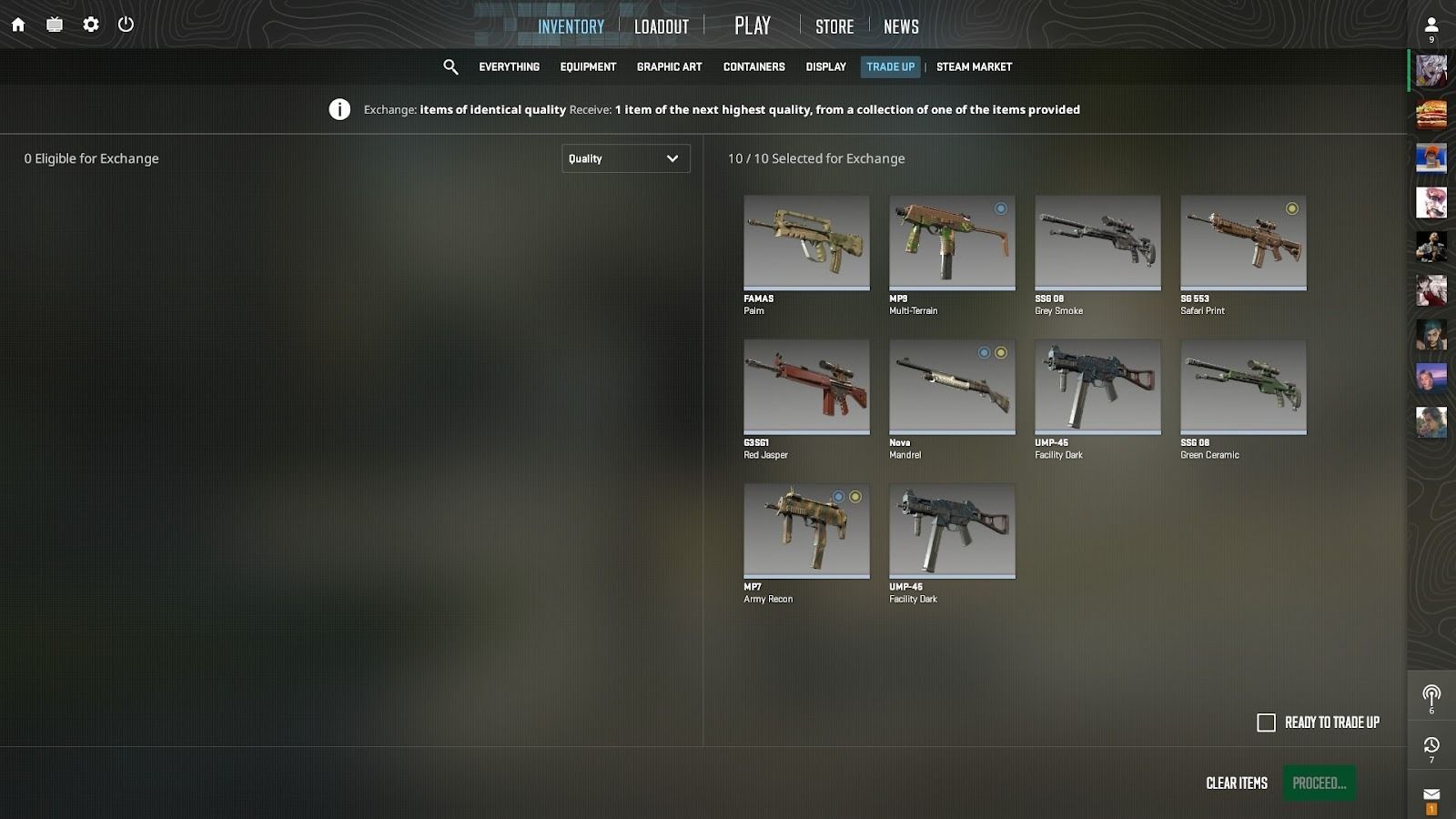
A Trade Up Contract is a CS2 mechanic that exchanges 10 identical-rarity weapon skins for one higher-tier skin. Valve preserved the Trade Up Contract from CS:GO without altering the core rules. CS2 expanded the eligible input pool through new CS2 Cases including Kilowatt and Revolution. Output skins come from the same collections as the 10 input skins.
Skin Rarity Tiers are the quality classifications that govern eligible inputs and possible outputs. Ten Mil-Spec skins produce one Restricted skin. Restricted input skins produce one Classified skin. The Trade Up Contract benefits collectors who accumulate skins from weekly CS2 drops, case openings, and Steam Market purchases. CS2 selects the specific output skin randomly from the collections used as inputs.
How Does CS2 Skin Trading Work?
CS2 weapon skins are cosmetic finishes that alter a weapon's appearance without affecting gameplay or statistics. Valve introduced skins to Counter-Strike 2 to diversify the player experience and fund ongoing development. The CS2 skin economy peaked at over $6 billion in total market value in October 2025, before the Re-Retakes update crashed the market to approximately $4 billion.
CS2 players acquire skins through three primary channels:
- Weekly Care Package: earn 5,000 XP on official Valve servers to claim 2 free items per week; Prime Status required
- CS2 Case opening: purchase any active CS2 Case with a key to receive a random skin from that case's pool
- Steam Market and Trade Up Contracts: buy specific skins directly or craft higher-tier skins from existing inventory
Ways to Get Free CS2 Skins
How to Get CS2 Skins
The Steam Community Market lets CS2 players buy and sell weapon skins without intermediaries. Steam charges a 15% transaction fee on every sale. Direct player-to-player trades outside the Steam Community Market carry significant fraud risk. Valve's 7-day trade lock reduces exploitation, but peer trades still expose players to item theft. Always trade through official Steam interfaces.
CS2 skin prices depend on two primary factors: Skin Rarity Tier and Float Value. Float Value (Skinfloat) is a wear indicator between 0.00 and 1.00 that sets a skin's condition and price. Factory New skins carry floats between 0.00 and 0.07 and command the highest prices within any collection. Some Factory New finishes from rare collections reach tens of thousands of dollars. Pricing data across major CS2 platforms stabilized in 2026.
Trade Up Contracts represent one path to higher-tier CS2 skins alongside weekly drops, case openings, and direct purchases. Players who source input skins from free weekly drops complete trade-ups at zero cost. Purchasing input skins from the Steam Community Market adds direct cost to the process. Float Value optimization at input selection determines whether the output skin generates profit or loss on resale.
What Skins Can I Trade?
Starting from this section and until the end of the post, we'll talk about Trade Up Contracts. If you need to understand the basics of trading CS2 items between players, visit this page. Ok, let's find out what weapon skins you can exchange for items with the next highest quality. To do this, you must consider two factors: weapon grade and condition.
Weapon Grade (Rarity, Quality)
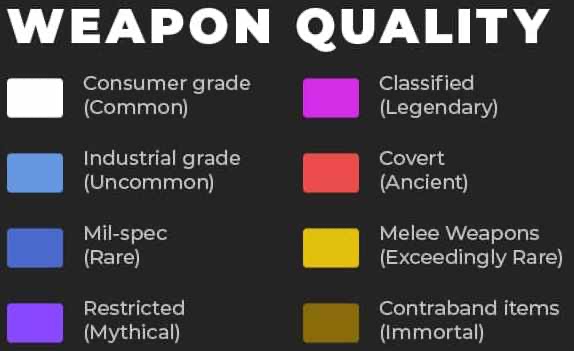
Trade Up Contracts accept five Skin Rarity Tiers as inputs: Industrial Grade, Mil-Spec, Restricted, Classified, and Covert. CS2 identifies each tier by a distinct color. Industrial Grade displays light blue, Mil-Spec displays navy blue, and Covert displays red.
Rarity Tier Progression
| Tier | Color | Trade Up Input | Output Tier |
|---|---|---|---|
| Consumer Grade | White | Not eligible | N/A |
| Industrial Grade | Light Blue | Yes (10 inputs) | Mil-Spec |
| Mil-Spec | Blue | Yes (10 inputs) | Restricted |
| Restricted | Purple | Yes (10 inputs) | Classified |
| Classified | Pink | Yes (10 inputs) | Covert |
| Covert | Red | Yes (5 inputs) | Knife or Gloves |
Trade Up Contract output selection depends entirely on which collections the 10 input skins belong to. CS2 draws randomly from all eligible Mil-Spec skins across the contributing collections. Each contributing collection adds its Mil-Spec skins as possible outcomes.
| Source Skins (Industrial Grade) | Possible Mil-Spec Outcomes |
|---|---|
| Dual Berettas | Polished Malachite (Boreal Collection) |
AK-47 | Wintergreen, USP-S | Tropical Breeze, XM1014 | Copperflage, MAC-10 | Poplar Thicket, MP5-SD | Gold Leaf |
| SG 553 | Basket Halftone (Radiant Collection) |
MP9 | Shredded, Glock-18 | Coral Bloom, P250 | Red Tide, SSG 08 | Blush Pour, AWP | Arsenic Spill, M4A1-S | Rose Hex |
| 5× Dual Berettas | Polished Malachite + 5× SG 553 | Basket Halftone | All 11 outcomes above |
Submit 10 Dual Berettas | Polished Malachite skins from the Boreal Collection and CS2 draws from 5 Mil-Spec outcomes. Each outcome carries a 20% probability. The Boreal Collection contains AK-47 | Wintergreen, USP-S | Tropical Breeze, XM1014 | Copperflage, MAC-10 | Poplar Thicket, and MP5-SD | Gold Leaf at Mil-Spec rarity.
SG 553 | Basket Halftone belongs to the Radiant Collection, which contains 6 Mil-Spec skins. Ten identical SG 553 | Basket Halftone inputs produce one of six Radiant Mil-Spec outcomes at approximately 16.67% probability each. CS2's trade-up algorithm selects the specific outcome randomly.
The mixed contract combines 5 Dual Berettas | Polished Malachite inputs and 5 SG 553 | Basket Halftone inputs. CS2 selects a collection group first, with 50% probability for each group. Boreal group selection draws from 5 Mil-Spec outcomes at 20% each. Radiant group selection draws from 6 Mil-Spec outcomes at 16.67% each. Always verify output values with a Trade Up Profitability Calculator such as TradeUpLab before confirming any contract.
Weapon Skin Condition
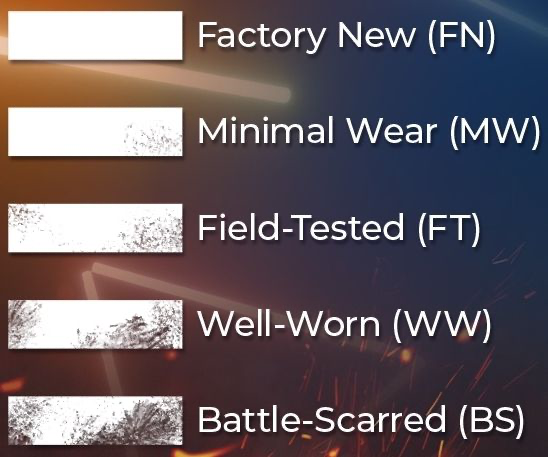
Float Value (Skinfloat) is a CS2 skin attribute measured between 0.00 and 1.00 that determines wear condition and resale price. Lower float values produce better-condition skins worth more on the Steam Community Market. The input float average directly controls the output skin's float in Trade Up Contracts. Factory New skins carry the highest market prices in CS2. Battle-Scarred skins sell for the least.
Float Value Ranges by Condition:
- Factory New (FN): 0.00-0.07
- Minimal Wear (MW): 0.07-0.15
- Field-Tested (FT): 0.15-0.38
- Well-Worn (WW): 0.38-0.45
- Battle-Scarred (BS): 0.45-1.00
Trade Up Contract output float uses the Average Float Formula:

| Output Skin | Calculated Float |
|---|---|
| AK-47 | Wintergreen | ~0.00075 |
| USP-S | Tropical Breeze | ~0.00055 |
Submit 10 Dual Berettas | Polished Malachite skins from the Boreal Collection, each at float 0.001, to apply the Average Float Formula. At input float 0.001, AK-47 | Wintergreen and USP-S | Tropical Breeze both land in Factory New condition. Float calculators like CSFloat and TradeUpLab automate the Average Float Formula in 2026, preventing costly float errors.
How to Trade CS2 Skins?
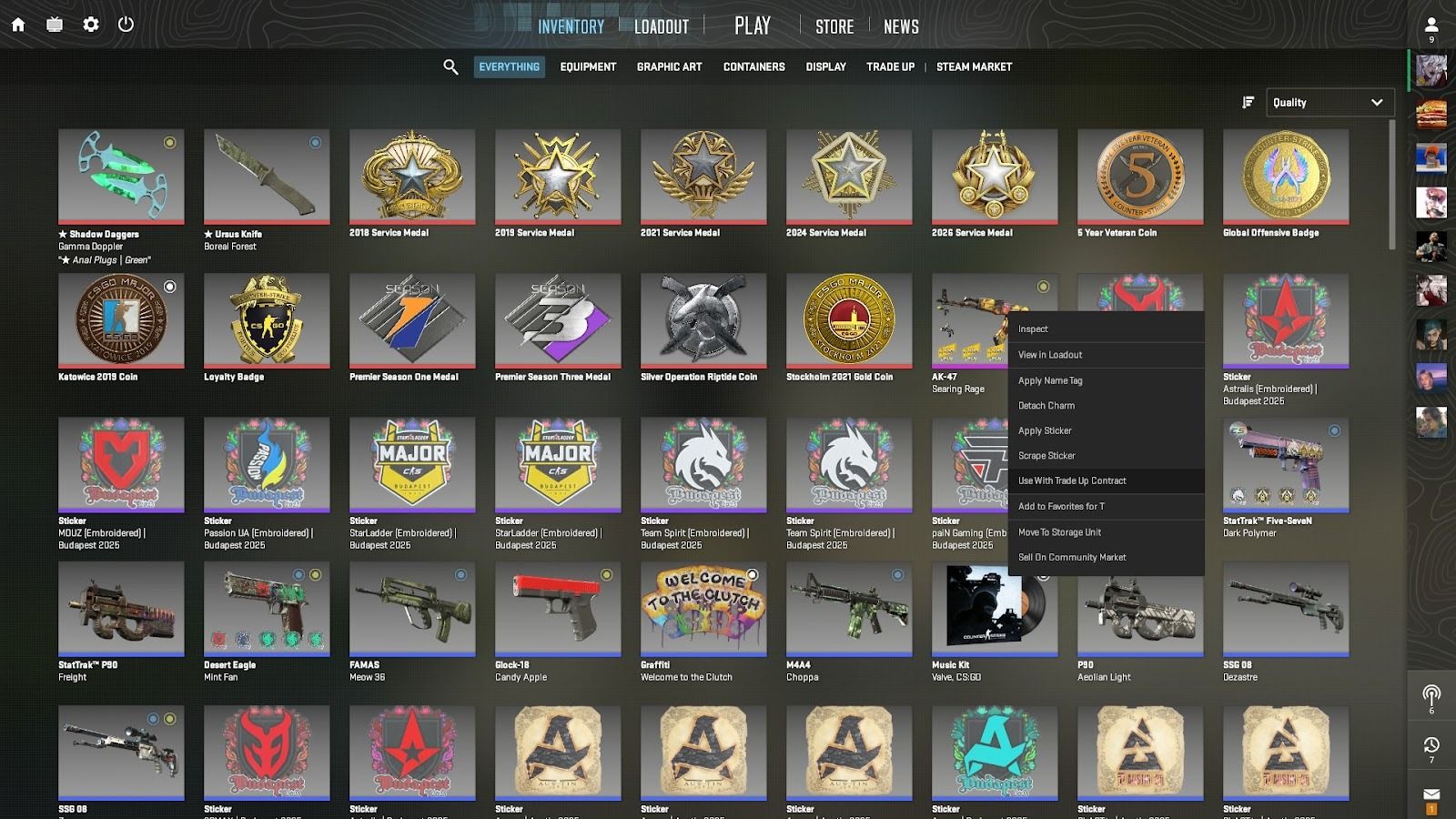
- Open CS2 and navigate to your Inventory tab.
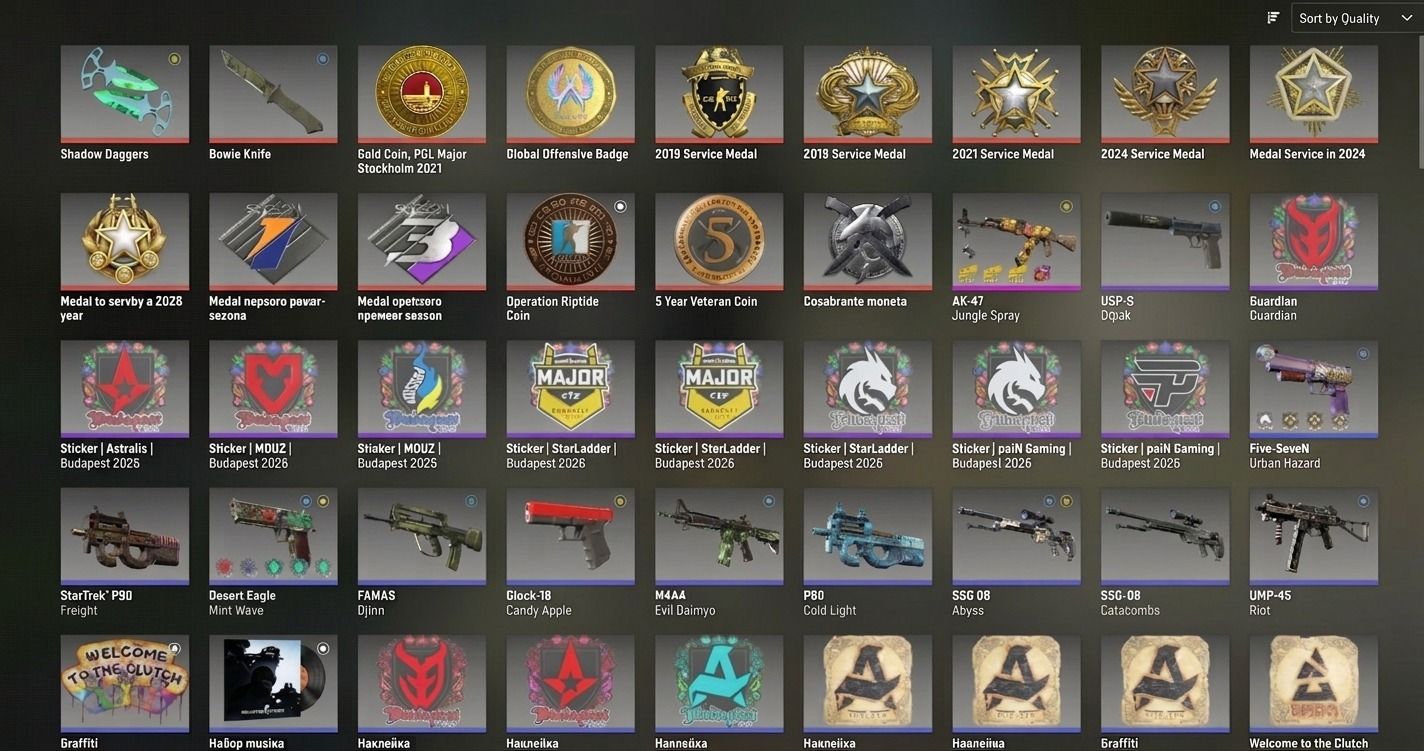
- Select the Trade Up Contract section from the inventory screen.
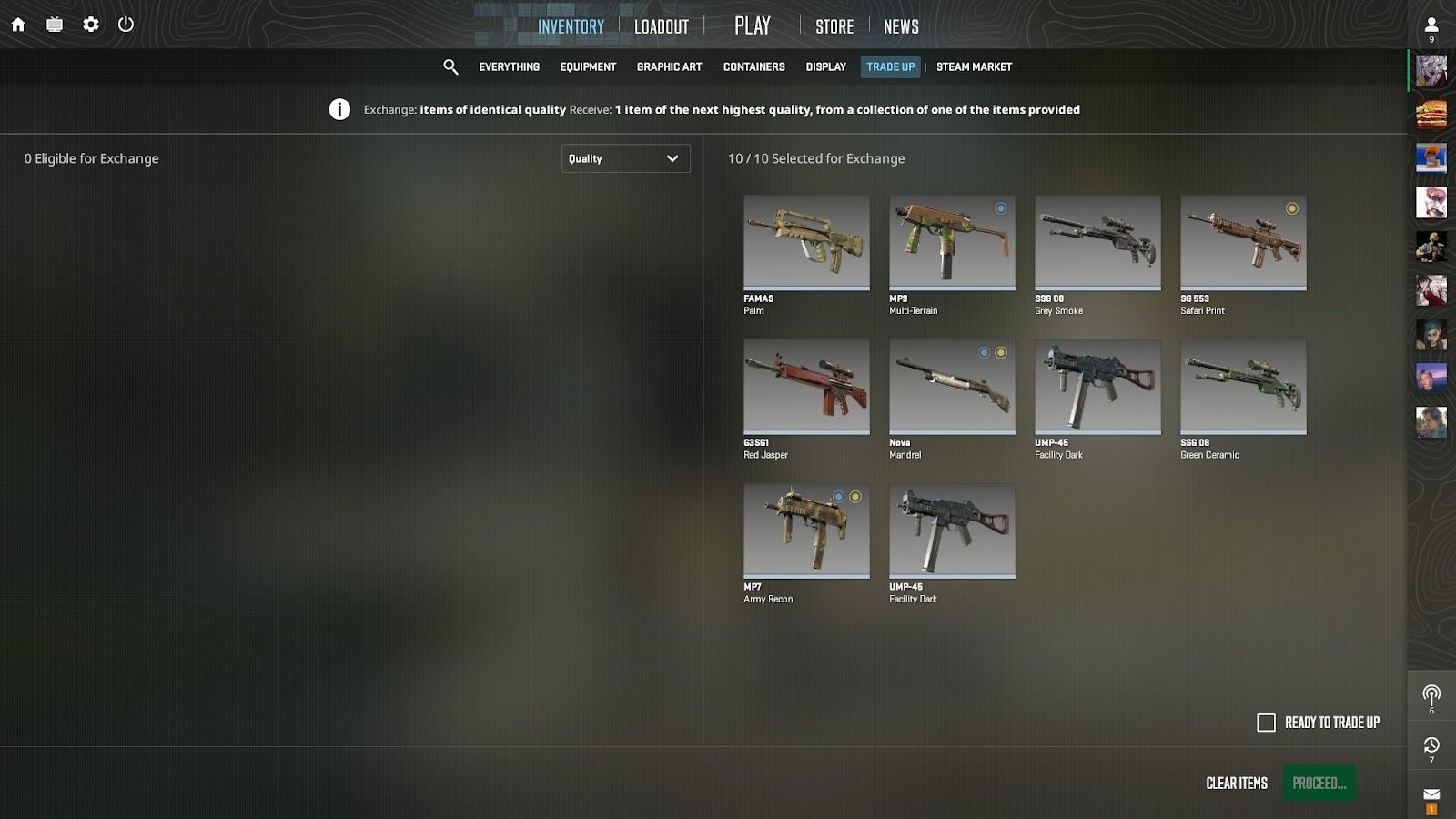 Right-click a skin you want to include and select Use With Trade Up Contract.
 - Repeat step 3 nine more times. All 10 skins must share the same Weapon grade.
-
Click the Proceed button.
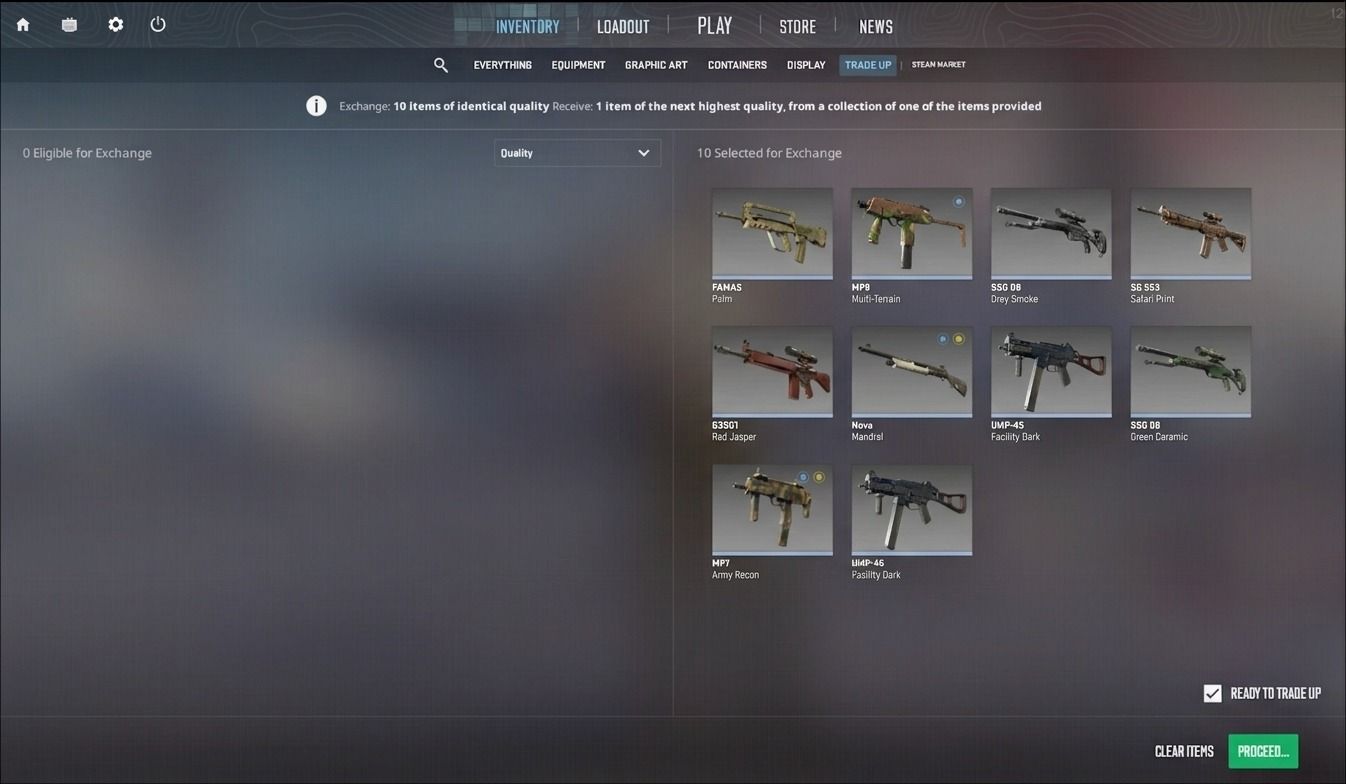
- Sign the contract with your mouse and submit to confirm.
-
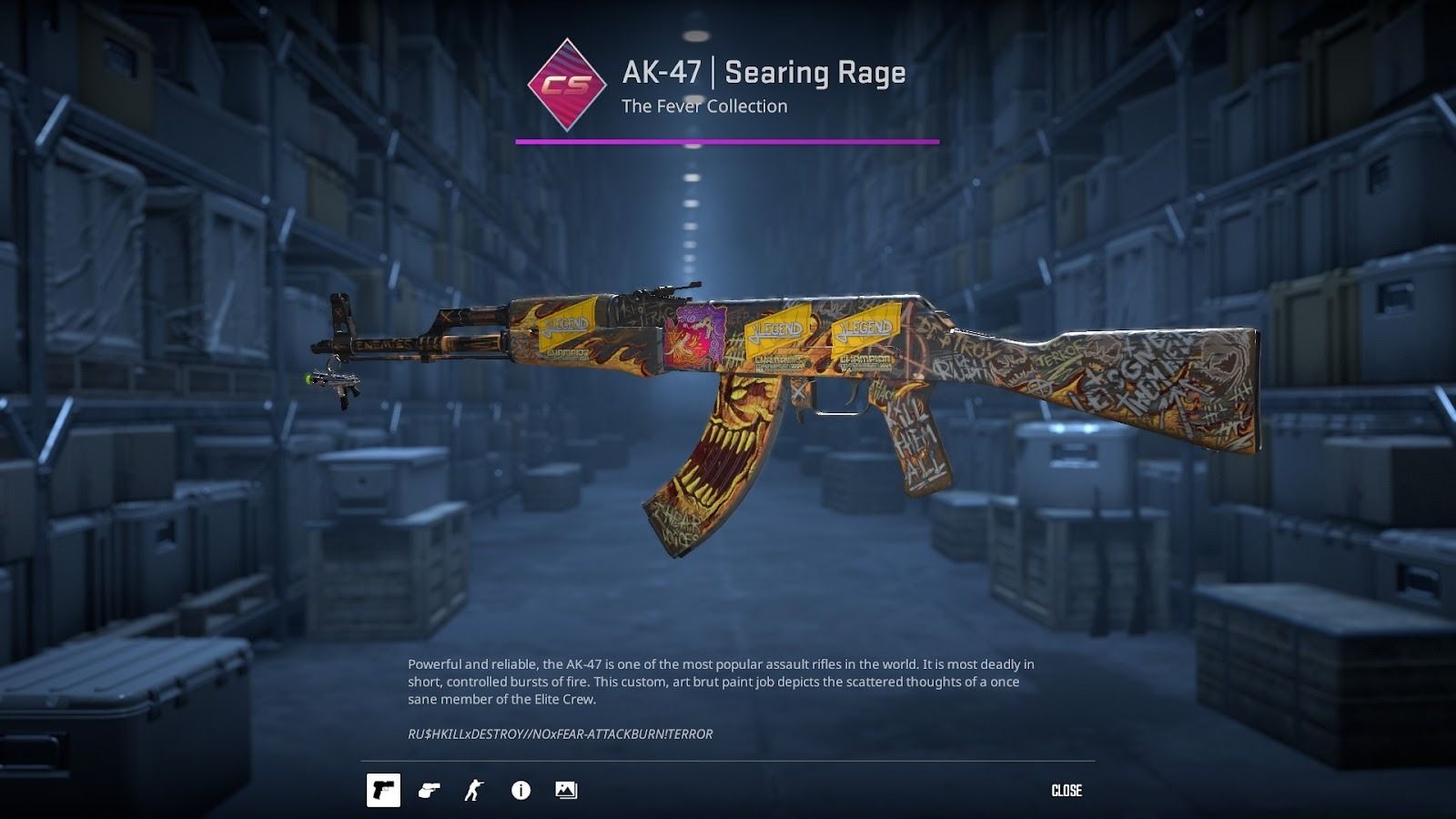
Receive your new skin.
- Saves hours of manual collection research and float calculation per contract
- Prevents float selection errors before committing skins to any Trade Up Contract
- Calculates profit potential, outcome probabilities, and float projections instantly
- Market volatility after major CS2 updates
- Float RNG on output wear conditions
- Price manipulation in low-liquidity collections
- Collection rotation removing trade-up eligibility
- 7-day Trade Protection locks on P2P-traded items
- Start with $5-10 Low-Risk Trade Ups before scaling contracts
- Run a Trade Up Profitability Calculator before every contract
- Track Steam Market trends 1-2 weeks before executing major contracts
- Diversify across collections; cap losses at 20% of inventory value
The Trade Up Contract process takes 1-3 minutes on average. Valve refined this system in CS2 to be even more intuitive. Players who want to exchange unnecessary skins for a more valuable item find the process quick.
Maximizing Trade Up Contract profit demands more time and careful preparation. Choose the right skins based on Weapon grade and float values before submitting. Float value selection is quite difficult without prior CS2 skin trading experience. Running a Float Calculator check first verifies output float projections and confirms profitable prices.
Can I Earn Money on Craft?

Yes, you can. Trade Up Contract profit materializes when the outcome skin's Steam Market value exceeds total input cost.
Two approaches exist for profitable CS2 Trade Up Contracts. The manual approach requires exploring dozens of CS2 collections, calculating output floats, and verifying Steam Market prices per outcome. Manual research demands hours for each contract attempt.
The second approach uses a Trade Up Profitability Calculator. TradeUpLab and CSFloat both offer 2026 trade-up calculators that compute outcome floats, collection pools, and profit margins automatically. Enter your input skins, select quantities, and both tools return complete output analysis in under 30 seconds.
Enter 10 Dual Berettas | Polished Malachite skins from the Boreal Collection into TradeUpLab, for example. The calculator identifies all five Mil-Spec outcome skins and displays float projections instantly. Current Steam Market prices appear for every outcome without additional research.
Most Profitable Trade Up Contracts in 2026 yield 10-30% returns on average. High-risk Covert contracts multiply input value 2-5x with proper Market Trend Analysis. Conservative traders achieve consistent 15-20% gains through Best CS2 Trade Ups.
Calculator Advantages:
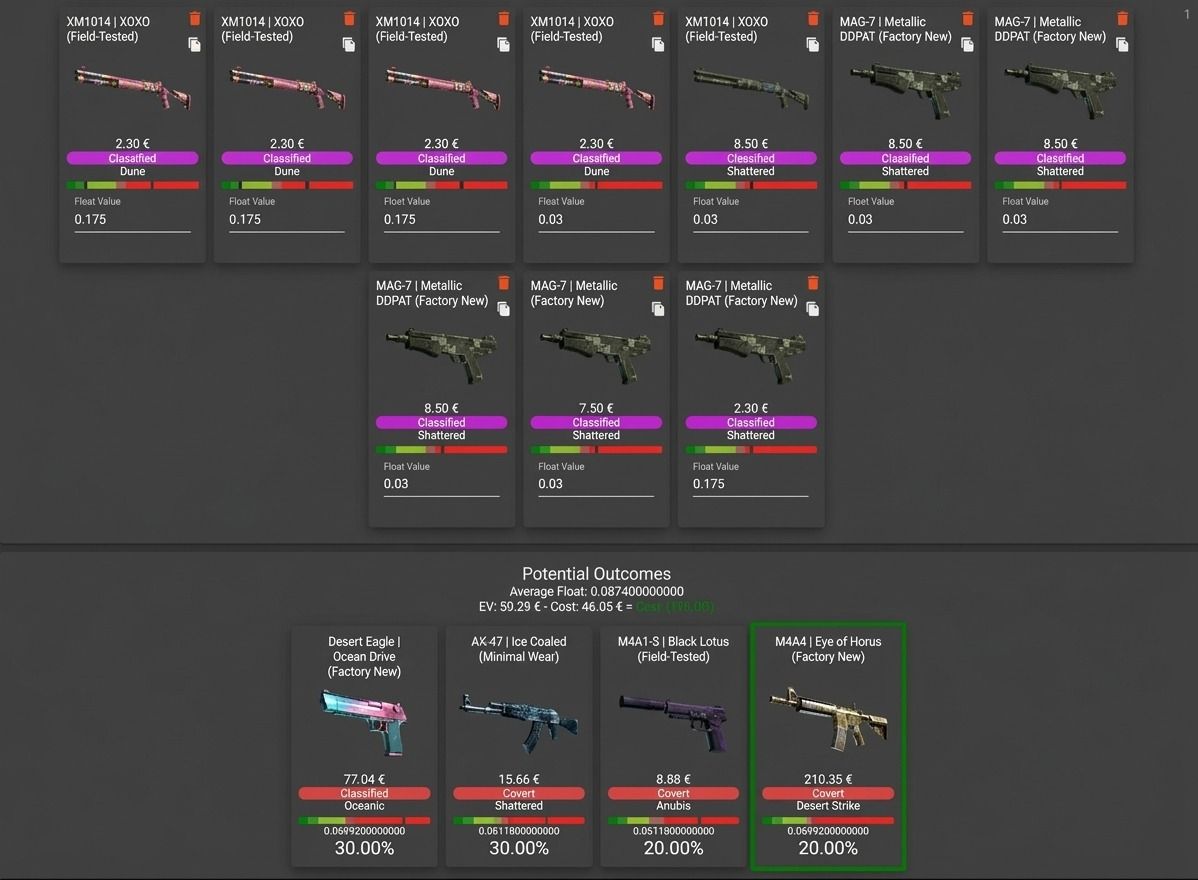
Beyond time savings, TradeUpLab and CSFloat protect traders from costly input selection mistakes. Both tools allow experimentation with different skin combinations before committing to any single Trade Up Contract. Traders who use calculator tools consistently identify Best CS2 Trade Ups with higher profit margins.
Best CS2 Trade Up Strategies for Maximum Profit
Success in CS2 trade-ups demands strategic thinking beyond basic mechanics. The following proven tactics help maximize returns while minimizing risks. Apply these tactics consistently for optimal results.
Combine Different CS2 Weapons
During Trade Up Contracts, combine skins from different CS2 collections within the same rarity grade. Mixing cheaper and more expensive input skins sometimes reduces total input cost while preserving access to high-value Mil-Spec outcomes.
Select Items with the Same Stats When Possible
Selecting skins with identical float values makes CS2 trade-up output float projections predictable. Consistent input floats reduce variance in the output skin's condition, increasing the probability of Factory New results on profitable contracts.
Aim for Factory New Skins
Factory New CS2 skins command the highest prices within any collection. Most Trade Up Contracts turn unprofitable when output floats exceed 0.07. Target input floats below 0.07 for Factory New results.
Always Use Online Services Before Making Every Exchange
A Trade Up Profitability Calculator prevents costly mistakes when targeting expensive output skins. TradeUpLab and TradeUpSpy both deliver float projections and profit estimates in seconds before every contract.
Read Our Blog Regularly
The PLG.bet blog publishes regular guides on CS2 skin trading, Trade Up strategies, and market analysis. Bookmark the blog and check it before committing to any high-value Trade Up Contract.
Understanding Trade Up Risks and Risk Management
Even well-planned Trade Up Contracts offer no guaranteed profit. Steam Market prices fluctuate, float outcomes stay probabilistic, and timing directly affects returns. A Float Calculator and Market Trend Analysis improve accuracy but cannot eliminate inherent contract risk. Precise planning reduces but never eliminates market volatility or float RNG exposure.
Specific CS2 trade-up risks every trader must recognize before committing inventory:
Common Trade Up Risks:
Four strategies reduce exposure for both Low-Risk Trade Ups and High-Risk Trade Ups:
Risk Management Strategies:
CS2 vs CS:GO Trade Up Changes
CS2 Trade Up Contracts preserve the exact CS:GO formula. The same 10-skin exchange, rarity progression, and Float Calculator apply without modification. CS:GO trade-up experience transfers directly to CS2.
Valve modernized the Trade Up Contract interface in CS2. The cleaner contract screen makes Factory New float targeting more precise. New CS2 Cases like Kilowatt and Revolution added new trade-up opportunities. Legacy CS:GO collections continue to function in 2026.
The CS2 market adjustment period from 2023 to 2024 resolved by early 2026. Steam Market pricing stabilized, and mature tools like TradeUpLab and CSFloat now support precise Trade Up Contract planning.
| Feature | CS:GO | CS2 |
|---|---|---|
| Core Mechanics | 10 skins exchange, rarity-based output | Identical; Covert trade-ups added October 2025 |
| Interface | Legacy inventory and contract screen | Modernized contract screen, cleaner inventory management |
| Collections | CS:GO-era collections only | CS2-exclusive cases (Kilowatt, Revolution) plus all legacy |
| Calculator Tools | Basic float estimators | Mature 2026 tools: TradeUpLab, CSFloat, TradeUpSpy |
FAQ
Can you trade up to a knife in CS2?
Standard Trade Up Contracts cannot produce knives. Since October 2025, five Covert skins from one CS2 case collection may yield a knife. Steam Market remains the fastest knife source.
How long do you have to wait to trade CS2 skins?
Valve's CS2 anti-fraud measures apply a 7-day Trade Protection to all P2P-traded skins. Protected inputs cannot enter Trade Up Contracts. Trade-up results from unprotected inputs become tradeable immediately.
Pro Tip: Buy trade-up inputs from the Steam Community Market. Market purchases carry no Trade Protection, so inputs enter any Trade Up Contract immediately without waiting.
Can you trade up Tec-9 Red Quartz in CS2?
No. The Tec-9 | Red Quartz carries Restricted rarity in The Train Collection in CS2. Restricted is the collection's highest tradeable grade. No trade-up target exists above Restricted.
Can you trade up red skins in CS2?
Since October 2025, five Covert red skins from the same collection yield a knife or gloves. Collection determines the output pool. StatTrak inputs produce StatTrak Gold items.
Can you trade up to a gold skin in CS2?
Gold rarity in CS2 covers knives and gloves, introduced October 2025. Trade Up Contracts randomize Gold outputs from the input collection. Players cannot target specific Gold finishes or patterns.
Can you trade up souvenir skins in CS2?
No. Souvenir skins cannot enter CS2 Trade Up Contracts. Valve excludes Souvenir tournament drops from the trade-up system. Only standard and StatTrak™ weapon skins qualify as valid inputs.
Can you trade up to gloves in CS2?
Since October 2025, five Covert skins from glove-case collections can produce gloves. Standard trade-ups below Covert cannot yield gloves. Steam Market listings remain the simplest glove source.
Are trade-up result skins trade locked in CS2?
Trade-up results from unprotected inputs are immediately tradeable. If input skins carry active Trade Protection locks, the 7-day restriction transfers to the result. Covert→Gold trade-ups (knives and gloves) carry a separate 7-day hold regardless of input status.
How many skins do you need to trade up from Covert?
Ten Classified skins produce one Covert skin in a standard Trade Up Contract. Five Covert skins from the same collection yield a knife or gloves since October 2025.
Can you sell CS2 trade-up results immediately?
Yes, if input skins carried no Trade Protection. Trade-up results inherit any active 7-day restriction from protected inputs. Covert→Gold results (knives, gloves) carry a 7-day hold before Steam Market listing.
Pro Tip: Run a Float Calculator and Trade Up Profitability Calculator before every contract. Both tools verify profit potential and output float projections in under 30 seconds.
PLG.bet and CS2 Trade Ups